Switching Payroll Providers? The Things You Should Check Before Processing Your First Payroll
Before you end your payroll service provider's contract, can you answer a basic question: Who is responsible for payroll payments, tax deposits, and filings that are still outstanding?
There may be different parties responsible for part of the payroll process. A clear assignment of payroll responsibilities is important during a provider change. If this is not the case, some payroll processes (e.g., payroll payments, tax deposits and/or filings) may be left unattended, even while payroll continues to be processed in the normal course.
This checklist is intended to help ensure the handoff of payroll processes and to identify what you need to evaluate and/or inquire about before processing payroll.
This checklist is restricted to a change of payroll service provider for the same employer and the same employer identification number (EIN). Other business changes, including changes in ownership or certain third-party employer arrangements, may warrant creation of a customized transition plan.
Determine the Date of the Last Payroll Processed by the Prior Provider and the First Payroll Processed by the New Provider
Using a calendar that both payroll service providers can reference, determine the last payroll processed by the prior provider and the first payroll processed by the new provider. Record the dates as well as the time periods the payroll processes cover.
Make sure you identify the time periods, processes and procedures that may be affected by the change, and who is responsible for transferring the data. If timekeeping systems are also changing, determine where employees should record their hours and how any hours crossing the transition date will be handled. Keep the original time records for later review.
Approval and Funds. Know when your provider requires approved hours and available funds. Anticipate automated clearing house (ACH) or bank verification requests and processes to ensure payment is made on time.
Unusual Items. Identify items outside the normal payroll process such as manual checks, bonuses, reimbursements or payroll adjustments. Assign ownership to ensure timely payment and recording.
Obtain Payroll Records Before Access Changes
Payroll Records. Obtain payroll records for all employees, including employees you will no longer be paying or for whom you will no longer be processing payroll. Determine when access will no longer be available, what records will remain accessible, and whether future corrections or requests for records will involve an additional charge.
Mid-Year Records. Prior to the end of the calendar year, obtain payroll records showing year-to-date totals for each employee, including terminated employees, and payroll registers showing net pay and withholding for each employee. Also obtain records showing payments of payroll taxes, filed returns, outstanding deposits, and records of garnishments and other employee benefit deductions.
Retain records to satisfy employment tax recordkeeping requirements. The IRS generally requires employers to retain employment tax records for at least four years after the tax becomes due or is paid, whichever is later. Other recordkeeping requirements may apply. Records relating to employment taxes include copies of withholding certificates, payroll records, tax deposit confirmations, and filed returns. Employers are also required to retain records showing employees' wages and taxes.
Review a few exported files to check that the information is accessible and complete. Make sure you can read the files and they cover the correct time periods. Also, check the files to see if sufficient employee-level detail is included, and confirm that information imported into the new system matches the original records.
Do not export or send sensitive employee information through unsecured means. Use a secure electronic portal or other means approved by the company to send the employee information.
Check Imported Payroll History for Each Employee
Sometimes a total will seem to be correct while the individual records are wrong. If the previous payroll records reflect that $2,400 and $1,600, respectively, of federal income tax were withheld from two different employees, and the new payroll system reflects $2,000 of withholding for each employee, both systems would reflect that $4,000 of federal income tax was withheld.
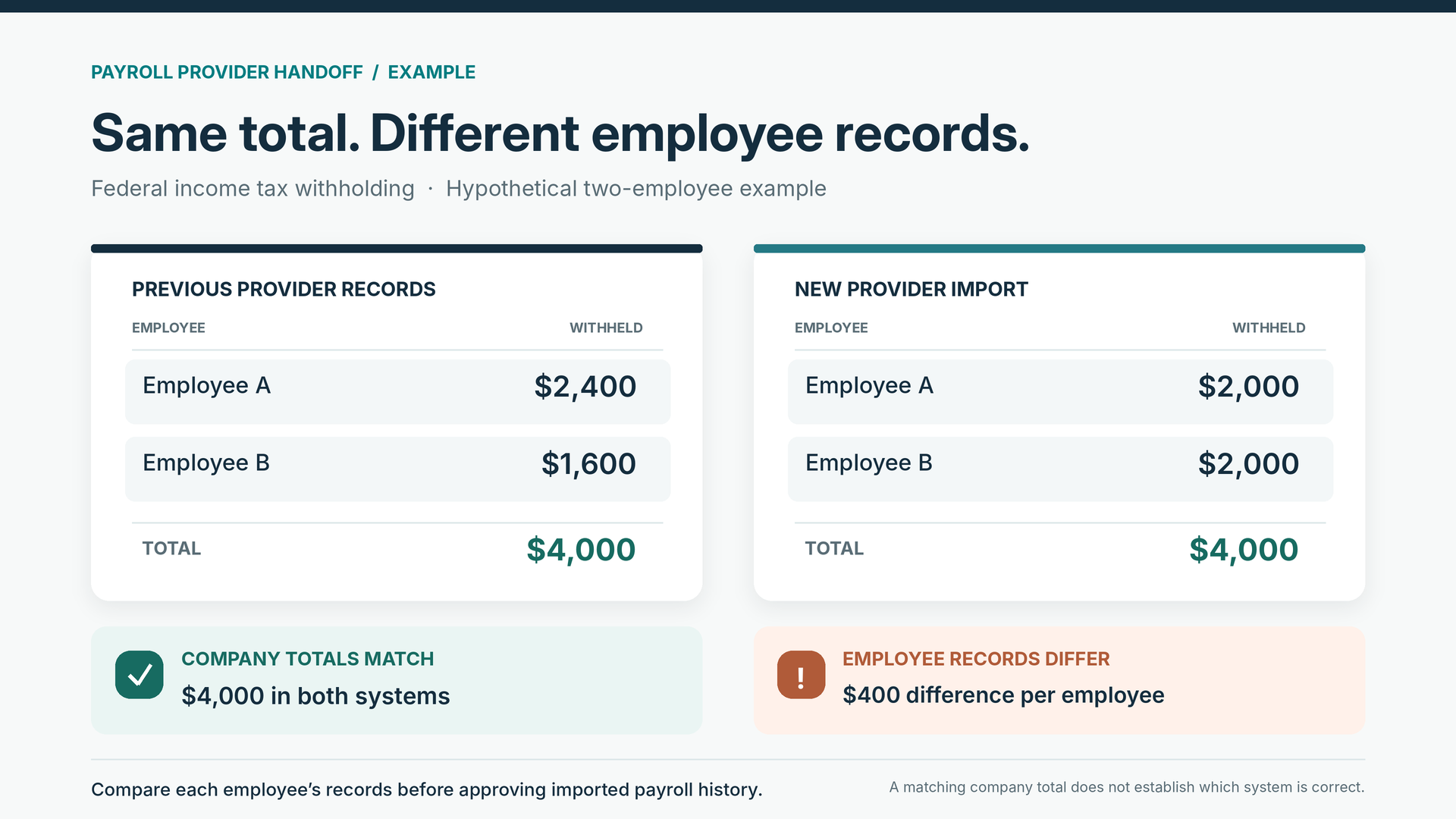
Matching company-wide payroll totals does not guarantee that individual employee records were imported correctly.
Review the new payroll system's records for the employees and compare them to the previous records to see if the new system reflected the correct withholding. The review should also include gross wages, wages subject to each payroll tax, the employer's contributions and the net pay. Make sure the provider explains what must agree and how they will address any differences.
Just because one system reflects a different result than the other, it does not mean the old system is wrong. The old system may have also had an error. The new system may have also changed the treatment of the pay. Find out what the new system is reflecting before agreeing to adjust the amount just to bring the two figures in line.
Previously paid wages should also be reflected in the historical records. Confirm that the entry of the records will not also release a payment to the same employee, represent a duplicate tax payment, or create an expense that was previously recorded. Do not run a second live payroll to enter wages just to bring the year-to-date totals up to date.
Bookkeeping and payroll processes can occur independently of one another. Intuit's instructions on adding pay history to QuickBooks Online Payroll say that payroll history entered during the setup process will not show up on financial reports, such as the profit and loss report. Verify how your system handles this process.
Review the First Payroll Before Approving It
Verify employees to be paid on the payroll preview report. As a small business owner, you should verify all employees. Ensure there is no omission or addition of employees during the move.
Verify the payment amounts, pay rates, hours and overtime calculations. Check employee withholding settings and direct deposit instructions through the provider's approved verification process. Make sure any payments already issued have not been included again.
Verify the status of employee benefits, including deductions and employer contributions. Check the status of employee benefit enrollment and transfers to the appropriate accounts.
Verify the status of employee pay and the reason for the change if the net pay is different from the previous pay. Changes in pay or withholding may require an explanation to employees regarding the new pay process and the reason for the change.
If the change is a reduction in withholding and a larger paycheck, this does not automatically mean the new payroll process requires an adjustment. Review the employee's withholding elections, taxable wages, pay period and any other changes before making corrections. Dispel any pay myths and ensure employees understand how to read their new pay statements.
Payroll statements should be easily accessible to employees, and payroll issues should be addressed promptly. If there are system issues, payroll should still be processed in accordance with applicable wage-payment laws.
Get Tax Payments and Filing Responsibilities in Writing
To prevent confusion, get the details in writing. Ask both providers to define their responsibilities after the last payroll and during the transition. A statement such as "We take care of payroll taxes" does not sufficiently break down a task.
The IRS considers employment tax reporting and deposits as separate obligations. Just because a return is filed on a quarterly basis does not mean a related deposit is also due on a quarterly basis. Clearly define the return obligations and the deposit obligations as separately assigned responsibilities.
Determine Who Files the Complete Quarter
In general, the IRS requires that Form 941, the quarterly federal payroll tax return, be filed only once for each quarter. In the case of an ordinary service provider change where the employer and EIN remain the same, both services should coordinate to ensure one complete original quarterly return is submitted to the IRS.
Certain third-party payer arrangements may have different reporting requirements. It should not be assumed that each provider should submit a separate original Form 941 for the payroll taxes it processed.
Provide clarification regarding which service will consolidate and account for all payroll information, submit the return, handle any remaining tax deposits, and provide proof of filing and payment.
Other state and local returns should also be considered.
Reach Closure on Year-End Processing
Identify who will prepare and file the W-2s and the wages and withholding to be reported on each.
Reporting multiple W-2s does not automatically indicate an error. According to the instructions for IRS Form W-2, reporting multiple forms for the same employee is allowed in certain circumstances, as long as the same wage and withholding amounts are not reported twice.
The objective is to avoid reporting gaps and reporting the same information more than once. Determine who is responsible for addressing the gaps and reporting corrections.
According to Social Security's guidance, if a W-2c correction is necessary, the corrected wage information generally must be submitted to the Social Security Administration and the employee must also receive a corrected statement. Providing the employee correction does not necessarily confirm that the correction has been filed with Social Security.
Keep the filing confirmation with the payroll records.
Payroll Provider Handoff Checklist
Use the following handoff checklist to document the responsible party for each item. Include a due date and confirmation of completion wherever applicable.
Last Old Payroll: Confirm pay dates, cutoff for time to be recorded, and funding requirements.
Payroll History: Review and resolve discrepancies, and identify who is authorized to change the data import.
Outstanding Taxes: Confirm the agency, tax type, reporting period, amount, due date, and person responsible for payment.
Quarterly and Annual Returns: Confirm the person responsible for filing each complete return and maintaining records of filing confirmation.
W-2s and Corrections: Review the person responsible for year-end reporting and the contact person for corrections after the former service is terminated.
Other Items: Review continuing benefit instructions, who is responsible for releasing funds, and when access to the prior system is no longer required.
Coordinate automatic filing and payment settings with both providers before adjusting or disabling them.
The plan should avoid having multiple assignments for the same work while ensuring nothing is left unattended.
Check Money After the First Disbursement
After the payroll report is completed, compare it to the money transfer and bank activity reports. Verify employee payments and tax withdrawals, and identify adjustments and service fees.
If an unexpected bank withdrawal occurs, request an explanation before making an adjustment to the accounting records.
Verify employees received their net pay on payday. Promptly contact the payroll service company for payment status and a bank trace, when appropriate, if a payment is missing.
Just because money is withdrawn from your account for payroll taxes does not guarantee the agency received the payment. Check the applicable agency account and request payment confirmation from the payroll provider if the deposit cannot be verified.
As a general rule, the IRS states that outsourcing a business function, like payroll, does not relieve an employer of its federal employment tax obligations. The IRS recommends that an employer retain its own Electronic Federal Tax Payment System (EFTPS) account access to verify that employment tax payments have been made.
Certain third-party payer arrangements may have different liability rules. Review payment records to ensure they are for the correct tax and payment period.
Payment records should be kept.
Promptly review the status of payments and records if there is a concern. If you think a payment was not made, investigate the situation and contact the responsible party. Avoid making a duplicate payment without checking the existing payment status, but do not allow the investigation to cause an applicable tax deposit deadline to be missed.
California Employers: Be Sure to Include the EDD in the Transition
Does your business have California payroll obligations? If so, confirm the Employment Development Department's (EDD) employer payroll tax account information and your business's access. The EDD has information about employer account enrollment.
Confirm the new payroll provider has completed the required authorization and can access the EDD account. EDD's e-Services for Business answers a series of questions about representative online access. Employers are able to cancel online access by a third party. Depending on the employer's need, the access of the former payroll provider should be terminated after outstanding work has been addressed.
Be sure to identify who is responsible for outstanding California payroll tax deposits and quarterly reports. These include the DE 9 and DE 9C reports for employers subject to those filing requirements. The EDD provides information about state payroll tax reports and other related forms. State payroll tax deposits may be required more frequently than quarterly.
Complete the Former Provider's Access and Outstanding Work
State reports, payroll deposits, and other outstanding payroll tax responsibilities must be addressed before the transition can be considered complete.
Prior to ending your engagement, make sure you understand the changes to the following: automated payments, scheduled filings, employee access, and historical reports.
Additionally, you should identify how the engagement will be terminated and whether the former provider will remain available for resolution support. Review any remaining account authorizations or powers of attorney and determine when they should be revoked or replaced. Coordinate those changes so they do not interfere with work the former provider is still responsible for completing.
If an error is identified, determine whether it impacts the payment of an employee, calculation of the business's payroll, the business's books, or a tax return that was previously filed.
Preserve the original records and have the appropriate professional evaluate the information to determine what corrective action is necessary. A January transition also requires attention to the prior year's reporting. If the new service is not set up with the correct information, the first payroll of the new year may contain errors. Changing providers does not automatically correct problems from the prior year, and someone must remain responsible for completing that work.
Consider White Sands Tax Services for Bookkeeping and Payroll Services
White Sands Tax Services provides payroll, bookkeeping, and tax preparation services for small businesses. If you are considering a payroll provider change, we can discuss your current setup, upcoming payroll dates, and the work that needs to be completed before and after the transition.
You can also review our payroll and bookkeeping services and pricing.
Contact White Sands Tax Services to schedule a free consultation and discuss your business's payroll and bookkeeping needs.
Disclaimer: This article provides general information and should not be considered individualized tax or legal advice. Requirements may vary depending on your business, employees, jurisdictions, and payroll service arrangements. Consult an appropriate professional regarding your specific circumstances.